
LiFePO4 batteries are widely used in energy storage, electric vehicles, RVs, solar systems, backup power supplies, and various portable devices. During use, battery voltage is important data for determining the current battery charge status, checking whether the battery is operating normally, and troubleshooting certain wiring problems. A single LiFePO4 cell typically has a nominal voltage of 3.2V; common 12V LiFePO4 batteries usually use a 4-series configuration, with a nominal voltage of approximately 12.8V; 48V-class LiFePO4 batteries usually use a 16-series configuration, with a nominal voltage of approximately 51.2V. Different battery specifications have different normal voltage ranges, so the battery type and rated voltage need to be confirmed before measurement.
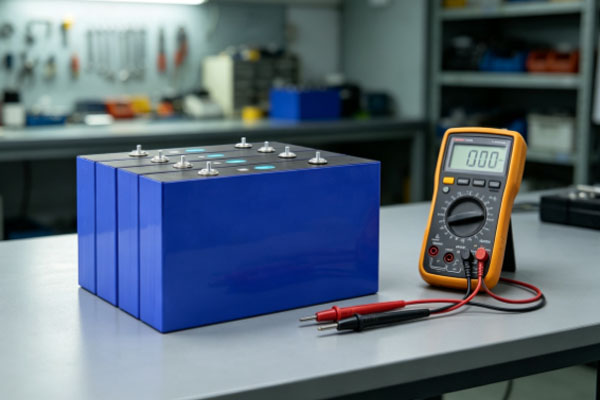
A multimeter is a commonly used tool for testing LiFePO4 battery voltage. When measuring voltage, set the multimeter to the DC voltage range, namely the “DCV” or “V⎓” setting, then place the red probe on the positive terminal of the battery and the black probe on the negative terminal, and observe the voltage value displayed on the screen. When measuring a single 3.2V cell, a low-range DC voltage setting can be used; when testing 12.8V, 25.6V, or 51.2V battery packs, select a range that covers the actual voltage. Digital multimeters usually support auto-ranging, making operation more convenient. It is important to note that a multimeter measures the voltage between the two battery terminals, and a single voltage reading cannot accurately determine the remaining battery capacity. Battery health also needs to be evaluated based on the resting voltage, load condition, charging status, and cell consistency.
Confirm the Multimeter Settings Before Testing
Select the DC Voltage Range
A LiFePO4 battery outputs direct current, so the DC voltage range (DCV) should be selected during measurement. If the multimeter uses manual ranging, choose an appropriate measurement range according to the battery’s rated voltage.
For example:
- For a single 3.2V cell, you can select a DC voltage range around 5V or 20V.
- For a 12.8V LiFePO4 battery, you can select a 20V or higher DC voltage range.
- For a 25.6V battery pack, select a range higher than the actual 25.6V voltage.
- For a 51.2V battery pack, select a range that can cover an actual voltage above 60V.
- If an auto-ranging multimeter is used, simply select the DC voltage measurement function.
Check the Probe Sockets
Before measuring, also confirm the probe connections. Common digital multimeters usually have a COM socket and a V/Ω socket. Insert the black probe into the COM socket and the red probe into the voltage measurement socket marked V, Ω, or VΩ. Do not insert the red probe into the current measurement socket and then directly touch both ends of the battery, because the internal connection of the current range differs from that of the voltage range. Incorrect operation may cause a short circuit or damage the multimeter.
How to Test LiFePO4 Battery Voltage with a Multimeter
Measuring a Single Cell
After confirming that the multimeter is set to the DC voltage range, place the black probe on the negative terminal of the cell and the red probe on the positive terminal. The number displayed on the screen is the voltage across the cell. A LiFePO4 cell with a nominal voltage of 3.2V will show different actual voltage readings under different charging and discharging conditions. For example, when fully charged, the voltage may be close to around 3.6V, while the voltage will gradually decrease after the cell has been at rest. Simply seeing 3.2V does not mean that the battery has no power, because 3.2V is only the nominal voltage and is not the minimum operating voltage of the cell.
Measuring a Battery Pack
The method for testing a battery pack is basically the same as testing a single cell. Taking a common 51.2V 100Ah LiFePO4 battery pack as an example, place the black probe on the negative terminal of the battery pack and the red probe on the positive terminal. The voltage displayed on the multimeter is the terminal voltage of the entire battery pack. If the measurement is around 51V and the battery is in a normal resting state, this is consistent with the 51.2V nominal voltage. If charging has just been completed, the voltage may be noticeably higher than 51.2V; if the battery is being discharged, the voltage may be lower than the resting voltage. Therefore, when testing, it is best to record whether the battery is charging, discharging, or resting.
How to Determine Battery Status Based on Voltage?
When a LiFePO4 battery is within the middle state-of-charge range, the voltage change may be relatively small. Therefore, it is not appropriate to determine battery capacity using a method such as “a 1V voltage drop means a certain amount of capacity has been consumed.”
Voltage During Charging
If the battery has just finished charging, the measured voltage is usually higher than its nominal voltage. For example, a 16-series LiFePO4 battery has a nominal voltage of 51.2V, and the voltage may reach a higher level at the end of charging. A higher measurement does not necessarily indicate a battery fault. It needs to be evaluated together with the charger’s output voltage, BMS parameters, and whether the battery has just finished charging.
Voltage in a Resting State
If you want to observe the battery condition through voltage, disconnect the battery from the charger and load, allow it to rest for a period of time, and then measure the voltage. The resulting voltage is more suitable for comparison with previous data. If the resting voltage of the same battery remains relatively stable each time, it is generally more useful as a reference than a single measurement.
Voltage During Discharge
When the battery is connected to a device, the load will cause a certain voltage drop. The greater the load power, the higher the operating current will usually be, and the more noticeable the terminal voltage drop may become. Therefore, when the voltage suddenly decreases, check whether a high-power device was connected at that time. If the voltage recovers significantly after the load is removed, the previous reading may have been mainly affected by the load, rather than indicating that the cell has been damaged.
Frequently Asked Questions
Q: Is It Normal for the Multimeter to Display a Negative Value?
If the red and black probes are connected in reverse, a digital multimeter will usually display a negative value. For example, if the actual voltage is 3.3V, reversing the probe polarity may result in a reading of “-3.3V.” This generally means that the measurement polarity is reversed and does not mean that the battery itself is producing negative voltage. Place the red probe on the positive terminal and the black probe on the negative terminal to measure again.
Q: If a 3.2V LiFePO4 Battery Measures Only 3.2V, Does That Mean It Has No Power?
No. 3.2V is the nominal voltage of a LiFePO4 cell, not the “empty battery voltage.” The voltage does not change significantly across a relatively large state-of-charge range, so seeing 3.2V alone is not enough to determine that the battery is depleted.
Q: Why Is the Voltage Not 3.2V After the Battery Is Fully Charged?
Because 3.2V is the nominal voltage, not the charge termination voltage. After the battery is fully charged, the cell terminal voltage will be higher than 3.2V. After charging stops and the battery rests, the voltage will gradually decrease.
Q: Which Range Should Be Used to Measure a 48V LiFePO4 Battery?
For a common 16-series LiFePO4 battery, the nominal voltage is approximately 51.2V. Therefore, the multimeter should be set to a DC voltage range that covers the actual voltage. If using a manual range, it is recommended to select a range higher than the battery’s maximum expected measurement voltage. If using auto-ranging, simply select the DCV function.
When using a multimeter to measure a LiFePO4 battery, select the correct DC voltage range and measure according to the positive and negative terminals. For a single 3.2V cell, the voltage can be measured directly across the two terminals; for 12.8V, 25.6V, 51.2V, and other battery packs, select an appropriate range according to the actual system voltage. The measurement result should be evaluated together with the battery’s current charging, discharging, and resting condition, rather than simply comparing a single number with the nominal voltage. For a 48V 100Ah LiFePO4 battery pack, a common configuration consists of 16 3.2V 100Ah cells connected in series, with a nominal voltage of approximately 51.2V. When using a multimeter for measurement, you can first check the terminal voltage of the entire pack, and then check the individual cell voltages according to the battery configuration and equipment conditions. A normal overall battery voltage does not necessarily mean that every cell is completely consistent. Therefore, when troubleshooting reduced capacity, shorter runtime, or frequent BMS protection, it is also necessary to pay attention to differences in individual cell voltages.
Multimeter voltage testing is a parallel measurement and the current range should not be used to directly measure the positive and negative terminals of a battery. For high-capacity battery packs already installed inside a battery box, it is also not recommended to open the housing or change the internal connections yourself simply to measure individual cell voltage. If abnormal voltage, hot terminals, housing deformation, unusual odors, or frequent BMS protection are detected, stop further operation and have the battery inspected by personnel with the appropriate experience. By using a multimeter correctly, you can quickly obtain the terminal voltage data of a LiFePO4 battery, providing a reference for determining the battery’s current operating condition, checking voltage abnormalities, and troubleshooting certain faults. It should be remembered that voltage is only one piece of data for evaluating battery condition and cannot independently represent the remaining capacity or battery health. Evaluating the battery based on its specifications, resting time, load power, charging status, and individual cell voltage differences will provide more accurate results.